
9.8 KiB
🛍️ Wearwell - Modern E-commerce Clothing Store


WearWell - a simple flask shopping web app for clothes
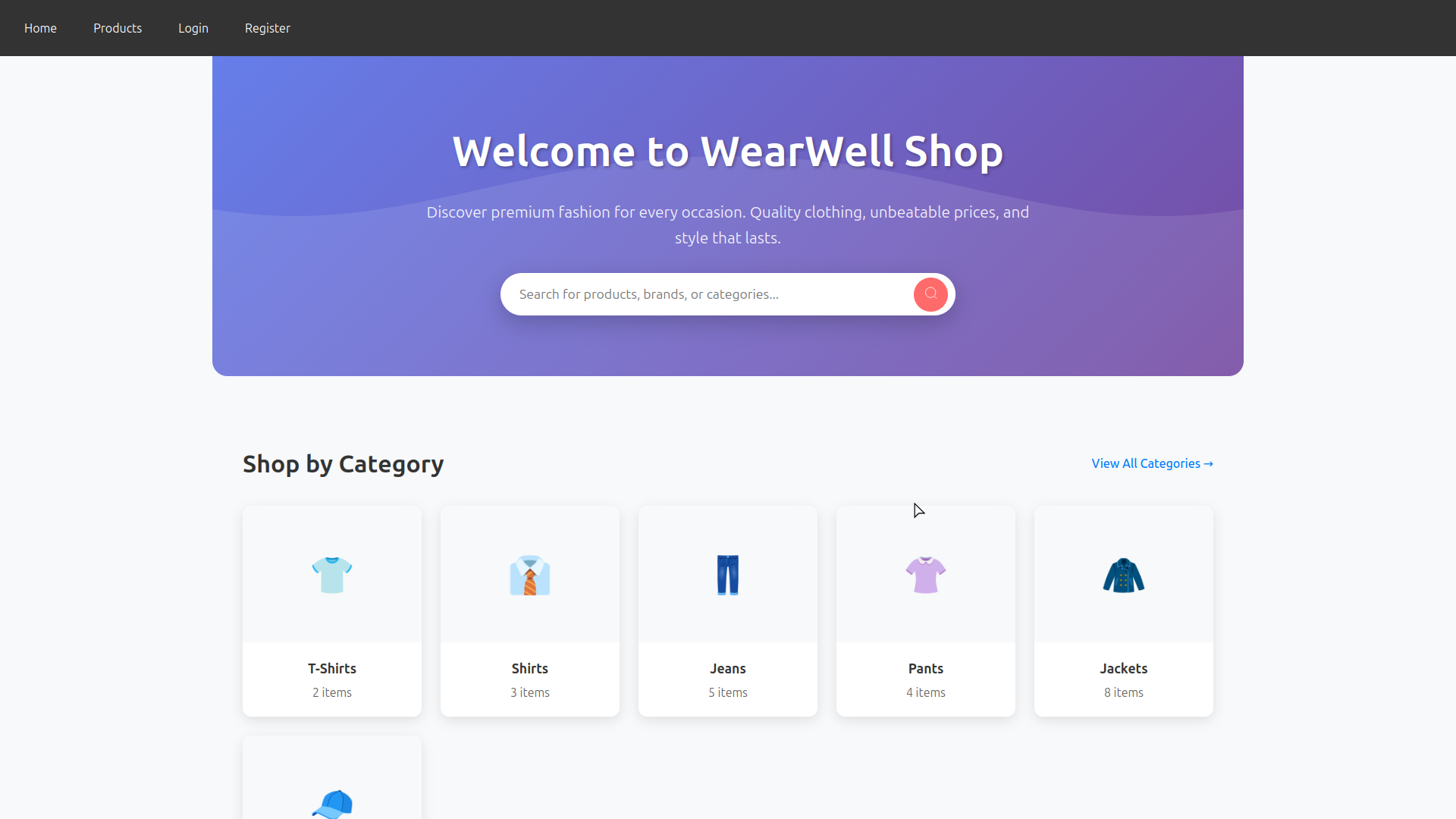
📋 Table of Contents
✨ Features
🛒 Core E-commerce Features
- User Management: Registration, authentication, profiles, order history
- Product Catalog: Categories, filters, search, product variations
- Shopping Cart: Session-based cart, cart persistence, quantity management
- Checkout Process: Multi-step checkout, shipping options, payment integration
- Order Management: Order tracking, status updates, cancellation/returns
- Inventory Management: Stock tracking, low stock alerts, backorders
- Reviews & Ratings: Product reviews, star ratings, photo reviews
🎨 User Experience
- Responsive Design: Mobile-first, desktop-optimized interface
- Image Gallery: High-quality product images
- Size Guides: Interactive sizing charts, fit recommendations
🔧 Admin Features
- Dashboard: inventory overview
🛠️ Technical Features
- Search Engine: fast product search
📁 Project Structure
Tree Structure of WearWell Project
wearwell/
├── .env.example              # Example environment of project (Database configures, etc)
├── .editorconfig             # Configurations of editor for formatting codes
├── app.py                    # Main Flask application entry point - initializes app, configures extensions, registers blueprints
├── extensions.py             # Centralized Flask extensions initialization (SQLAlchemy, Migrate, LoginManager, etc)
├── LICENSE                   # Project license file (GPL)
├── models.py                 # Database models definition (SQLAlchemy ORM - User, Product, Order, Cart, etc)
├── README.md                 # Project documentation, setup instructions, features overview
├── requirements.txt          # Python dependencies list for pip installation
├── seed_db.py               # Database seeding script - populates database with sample/test data
├── routes/                   # Flask route blueprints - modular URL routing by feature
│   ├── admin.py             # Admin panel routes - product management, user management, analytics
│   ├── auth.py              # Authentication routes - login, logout, registration, password reset
│   ├── cart.py              # Shopping cart operations - add/remove items, update quantities, view cart
│   ├── __init__.py          # Routes package initialization - exports blueprints
│   ├── main.py              # Public/main routes - homepage, product listings, search functionality
│   └── user.py              # User profile routes - profile management, order history, settings
├── static/                   # Static assets served directly by web server
│   ├── css/                 # Stylesheets for each page/component
│   │   ├── add_product.css      # Admin product addition form styling
│   │   ├── auth.css             # Login/registration form styling
│   │   ├── cart.css             # Shopping cart page styling
│   │   ├── categories.css       # Category listing/browsing styling
│   │   ├── checkout.css         # Checkout process styling
│   │   ├── dashboard.css        # Admin dashboard styling
│   │   ├── edit_product.css     # Admin product editing form styling
│   │   ├── home.css             # Homepage/landing page styling
│   │   ├── order_details.css    # Order summary and details page styling
│   │   ├── product_detail.css   # Individual product page styling
│   │   ├── products.css         # Product grid/listings styling
│   │   ├── profile.css          # User profile page styling
│   │   └── styles.css           # Global/base styles
│   ├── favicon.ico          # Browser tab/address bar icon
│   ├── images/              # Image assets (logos, backgrounds, etc)
│   │   └── default-product.jpg  # Fallback product image when none uploaded
│   └── js/                  # Client-side JavaScript files
│       ├── add_product.js       # Product form validation, image upload preview
│       ├── edit_product.js      # Product editing form interactions
│       ├── home.js              # Homepage animations, featured product carousel
│       ├── login.js             # Login form validation, password visibility toggle
│       ├── product_detail.js    # Product image gallery, quantity selector, add to cart
│       ├── products.js          # Product filtering, sorting, pagination
│       └── register.js          # Registration form validation, password strength
└── templates/               # Jinja2 HTML templates
    ├── admin/               # Admin panel templates
    │   ├── add_product.html    # Form for adding new products
    │   ├── categories.html     # Category management interface
    │   ├── dashboard.html      # Admin overview with statistics like CRUD table
    │   └── edit_product.html   # Form for editing existing products
    ├── base.html            # Base template with common layout (header, footer, nav)
    ├── cart.html            # Shopping cart display and management
    ├── checkout.html        # Checkout process steps and payment form
    ├── home.html            # Homepage/landing page
    ├── login.html           # User login form
    ├── order_details.html   # Detailed order confirmation and summary
    ├── product_detail.html  # Individual product display page
    ├── products.html        # Product grid/listings with filters
    ├── register.html        # User registration form
    └── user_profile.html    # User profile and order history
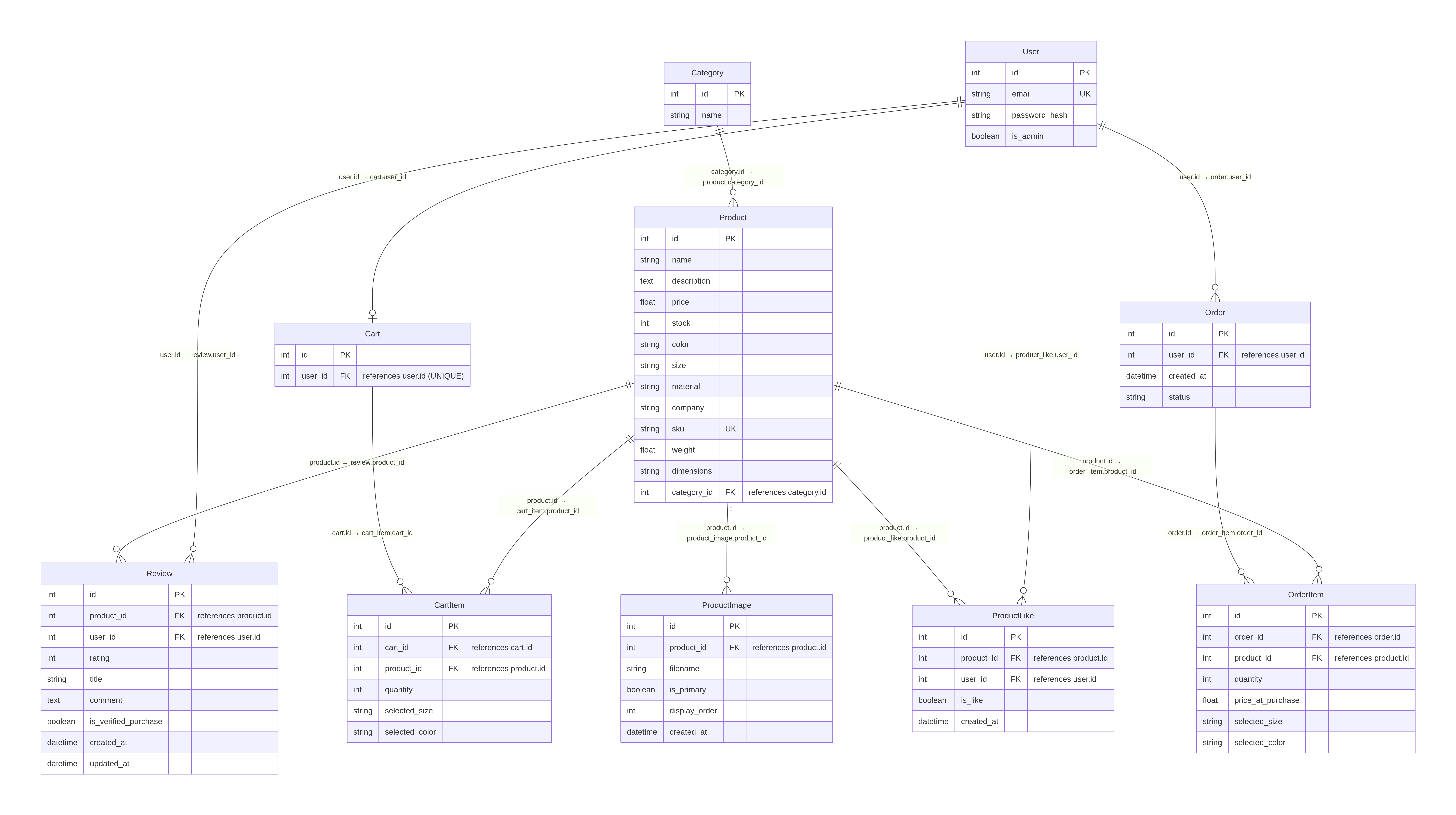
Database Structure
🌐 Application Routes
Main Routes
| Route | Template | Description |
|---|---|---|
/ |
home.html |
Homepage with featured products and promotions |
/products |
products.html |
Product catalog with filtering and sorting |
/login |
login.html |
User authentication form |
/register |
register.html |
New user registration form |
/cart |
cart.html |
Shopping cart with items and quantities |
/profile |
user_profile.html |
User profile management and personal information |
/checkout |
checkout.html |
Order checkout process with payment and shipping |
/admin |
admin/dashboard.html |
Admin dashboard with statistics and overview |
🚀 Setup
Prerequisites
- Python 3.12+ (also pip for installing requirements)
- MariaDB 10+ (MySQL) (Linux)
- XAMPP 3.3.0+ (MySQL) (Windows)
Linux debian-based distros (this apt command is only for practice it may be different)
sudo apt install python3.12 python3.12-venv mariadb-server mariadb-client
After installations of prerequisites depending on your OS follow the instructions below to run the web app
Installation
First clone the project
git clone https://git.broombox.org/amanfromspace/wearwell.git
then go to the folder by using cd command
cd ./wearwell
now make virtual environment with python in your project (development mode not for production)
python3 -m venv venv
activate venv (linux)
source ./venv/bin/activate
activate venv (windows)
source venv/scripts/activate
you are ready to install requirements
pip install -r requirements.txt
it is time for your database to be ready - enter to mariadb and do the instructions
CREATE DATABASE wearwell;
better to use this specially with utf8mb4_unicode_ci
CREATE DATABASE IF NOT EXISTS wearwell
    CHARACTER SET utf8mb4
    COLLATE utf8mb4_unicode_ci;
create a user with password
CREATE USER 'wearwell'@'localhost'
    IDENTIFIED BY 'password';
grant all privileges
GRANT ALL PRIVILEGES ON wearwell.*
    TO 'wearwell'@'localhost';
apply it
FLUSH PRIVILEGES;
now you can exit from mariadb and edit your .env file (use .env.example template of project environment)
DB_USER=wearwell
DB_PASSWORD=password
DB_HOST=127.0.0.1
DB_PORT=3306
DB_NAME=wearwell
here is the structure of databse url in .env
mysql+pymysql://wearwell:password@127.0.0.1:3306/wearwell
├─────────────┘ ├──────┘ ├──────┘ ├───────┘ ├──┘ ├──────┘
│                │        │        │         │    └─── Database name
│                │        │        │         └─── Port
│                │        │        └─── Host/IP
│                │        └─── Password
│                └─── Username
└─── Database driver (mysql with pymysql connector)
⚠️ Warning: Generate a random key as secret for your .env in production mode it is time to initialize the models from models.py to migrate tables, ... into database
flask db init
flask db migrate -m "Init"
flask db upgrade
📝 Important: You can use seed_db.py for fake data ( users, products, ... )
python3 ./seed_db.py
resets data then fills data again
python ./seed_db.py --fresh
run the app
python3 ./app.py